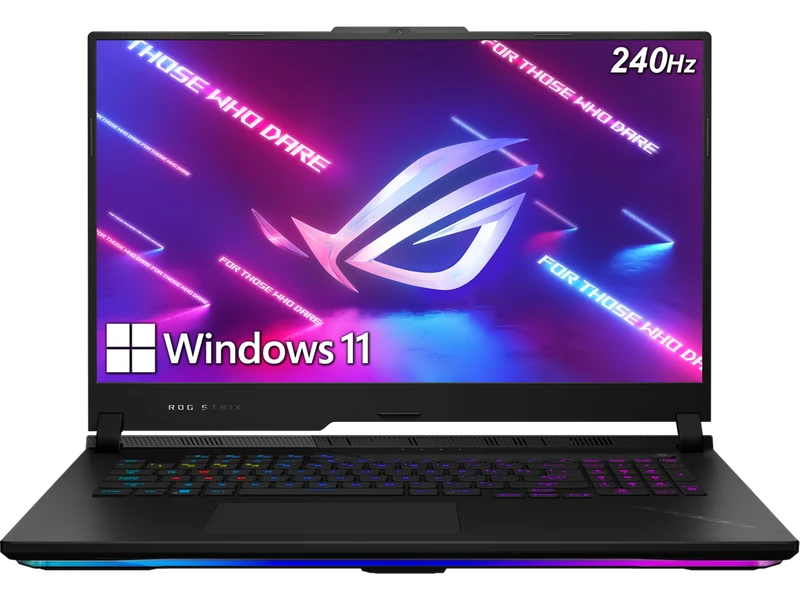
Overview — SCAR 18 Performance, 16-inch Size
The ASUS ROG Strix SCAR 16 pairs a maximum 175W RTX 5080 specification with ASUS's liquid-metal cooling design and MiniLED display technology in a smaller chassis than the SCAR 18. Its 2.8kg weight still places it firmly in the desktop-replacement class.
The 175W maximum power specification matches several competing RTX 5080 laptops, but sustained performance cannot be inferred from TGP alone. Cooling, firmware, CPU load, memory, and selected mode all affect the delivered result.
Compare the live checkout price with the Legion Pro 7i, Razer Blade 16, and other RTX 5080 systems. MiniLED versus OLED, portability, memory serviceability, and matching workload evidence are more useful decision factors than an unsupported universal performance or value claim.
Full Specifications
| GPU | NVIDIA GeForce RTX 5080 16GB GDDR7 — 175W TGP |
| CPU | Intel Core Ultra 9 275HX (24-core, up to 5.4GHz) |
| RAM | 32GB DDR5-5600 (2x16GB, upgradeable to 64GB) |
| Storage | 2TB PCIe Gen4 NVMe (2x M.2 slots) |
| Display | 16.0" matte Mini LED 2560x1600 240Hz/3ms, 100% DCI-P3; ASUS lists 1,200 nits peak and over 2,000 dimming zones |
| Battery | 90Wh (380W power adapter) |
| Weight | 2.8kg |
| Ports | 2x Thunderbolt 5, 3x USB-A, HDMI 2.1, 3.5mm combo, 2.5GbE LAN; no card reader |
| Connectivity | Wi-Fi 7, Bluetooth 5.4 |
| Keyboard | Per-key RGB, N-key rollover, 1.7mm travel |
| OS | Windows 11 Home |
Display: MiniLED at 16 Inches
ASUS describes the 16-inch panel as a matte Mini LED "Nebula HDR" display with over 2,000 dimming zones, 1,200 nits peak brightness, 100% DCI-P3, 240Hz and 3ms response. Ultrabookreview identifies a BOE panel and lists 2,304 zones, 1,100 nits HDR and 500 nits SDR, but its measurement setup did not work on this laptop, so no independent brightness, contrast or colour-accuracy figures are available from that review.
The panel can run as a single-zone display with IPS-like uniformity or with multi-zone local dimming for games and video. It is one of the few 2025 high-performance 16-inch laptops with a matte Mini LED rather than a glossy OLED: no burn-in concerns, but less perfect black levels. Both SCAR models list over 2,000 dimming zones; at 16 inches the 2560×1600 panel has about 189 PPI versus about 168 on the 18-inch model.
Gaming Performance and Benchmarks
The exact-configuration evidence below keeps native, DLSS Super Resolution, and Multi Frame Generation results separate. Maximum TGP and observed gaming power are labeled independently, and missing metrics remain N/A.
The verified rows show why rendering mode matters: native Ultra, RT Overdrive with MFG x2, and MFG x4 are different workloads and should not be presented as one generic "DLSS 4" result. Generated FPS can improve displayed smoothness, but it does not represent the same rendered performance or latency as native FPS.
Thermals and Cooling Evidence
ASUS documents liquid-metal thermal compound and a multi-fan cooling design for the SCAR 16 family. The figures below come from Ultrabookreview's G635LW test unit (RTX 5080, 32GB DDR5-5600, 1TB), not FRAMELIMIT measurements.
| Profile (CPU test) | CPU power | CPU temperature | Noise at head level |
|---|---|---|---|
| Silent | ~45W sustained | Low 70s °C | Under 35 dBA |
| Performance | ~120W | ~80°C | ~42 dBA |
| Turbo | 150–175W | ~95°C | ~48 dBA |
| Manual, max fans | 175W | ~90°C | 51–52 dBA |
In Performance mode the GPU ran at 135–150W and delivered roughly 90–95% of Turbo-mode performance with quieter fans. Silent mode caps the GPU at 55W. Ultrabookreview notes that the plastic armrest stays cooler to the touch under load than a metal one would.
Battery Life
The battery is 90Wh. At about 120 nits and 60Hz, Ultrabookreview measured roughly 3–5 hours of light use depending on the task and RGB lighting, and about 1 hour of gaming (Witcher 3, Performance mode). The laptop also charges over USB-C at up to 100W.
Build, Keyboard, and Ports
Ultrabookreview describes a plastic main chassis with a metal lid, a sharp front lip, and an excellent, quiet keyboard. A latch releases the bottom panel without tools, giving access to both SO-DIMM slots, two M.2 2280 slots (PCIe 5.0 supported), the fans and the battery. There is no card reader. All exhausts are at the back.
Use the exact ASUS specification and retailer listing to verify keyboard layout, memory and storage access, card reader, USB, display output, networking, and webcam configuration because regional variants can differ.
SCAR 16 vs SCAR 18 — Which to Buy?
This is the most common question for ASUS buyers at the flagship tier. The honest answer depends entirely on portability requirements:
Consider the SCAR 18 if you prioritize its RTX 5090 tier, 24GB of graphics memory and larger panel over portability. Confirm the premium with matched ray-tracing evidence and the live checkout price.
Buy the SCAR 16 if you want the same cooling approach in a smaller, lighter chassis. Notebookcheck found the RTX 5090's lead over the previous RTX 4090 relatively small at native QHD in the SCAR 18, so compare matched RTX 5080 and RTX 5090 rows for your games rather than assuming a fixed gap.
Final Verdict
Frequently Asked Questions
Benchmark context
No additional synthetic score is assigned to this configuration. A matching GPU name alone cannot establish matching performance: CPU, graphics power, memory and cooling can change the result.
For game-specific comparisons, use Notebookcheck’s game database and inspect the contributing laptop, resolution and preset. Separate native rendering, upscaling and frame generation. In 3DMark result search, inspect the individual run and configuration before comparing; a leaderboard entry is not a typical retail result.
The buying verdict
Is ASUS ROG Strix SCAR 16 right for you?
Choose it for
Mini-LED contrast and 16GB graphics memory.
Consider another option if
You prioritize portability or lower total spending.
FRAMELIMIT may earn a commission from qualifying purchases at no extra cost to you.