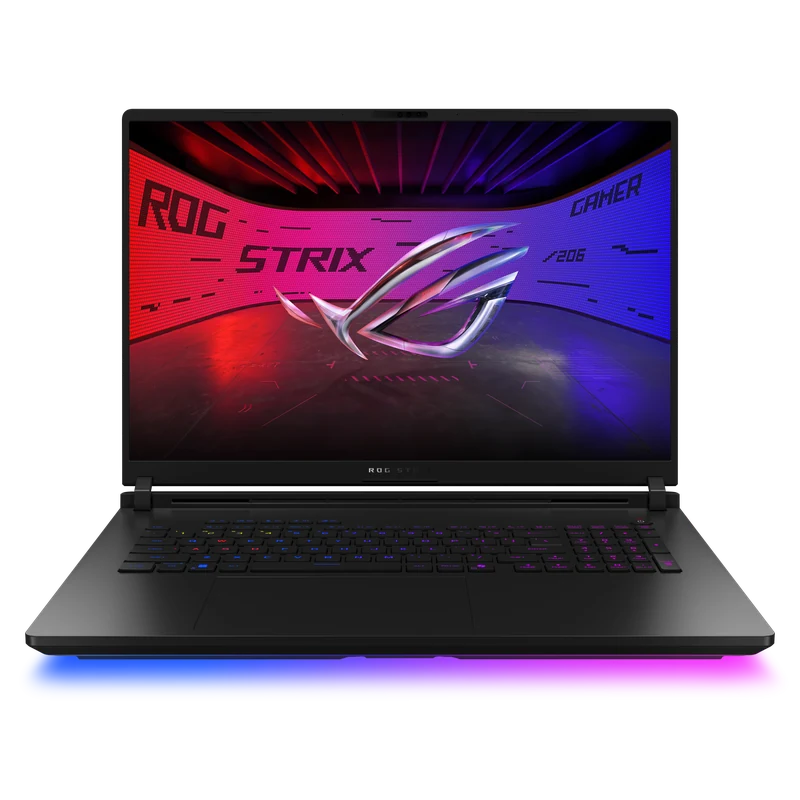
Overview and Who This Is For
The ASUS ROG Strix SCAR 18 is a desktop-replacement configuration built around an RTX 5090 rated up to 175W, an 18-inch MiniLED display, and ASUS's vapor-chamber, liquid-metal, and Tri-Fan cooling design. Maximum TGP and component tier establish its specification class, but not a universal performance lead.
This is not a laptop you take to a coffee shop. At 3.3kg with a 380W power adapter, the SCAR 18 is a desktop replacement that happens to be technically portable. Its position against other flagships depends on matched exact-SKU evidence and live price.
If portability matters at all to you, compare the ASUS ROG Strix SCAR 16 review or the Lenovo Legion Pro 7i Gen 10 review. For another 18-inch RTX 5090 approach, see the MSI Raider 18 HX AI review or the Alienware 18 Area-51 review. Cross-model performance percentages require matched test conditions.
Compare this exact RTX 5090 desktop replacement in the Best Flagship Gaming Laptops guide and the Best RTX 5090 Gaming Laptops guide, verify its 175W class in the RTX 50 Laptop TGP Database, and inspect sourced Average FPS and 1% Low rows in the DLSS and Frame Generation benchmark database.
Full Specifications
| GPU | NVIDIA GeForce RTX 5090 24GB GDDR7 — 175W TGP |
| CPU | Intel Core Ultra 9 275HX (24-core, up to 5.4GHz) |
| RAM | 32GB DDR5-5600 (2x16GB, upgradeable to 64GB) |
| Storage | 2TB PCIe Gen4 NVMe (2x M.2 slots, RAID 0 capable) |
| Display | 18.0" MiniLED QHD+ (2560x1600) 240Hz, 1100-nit HDR, 100% DCI-P3, 2048 dimming zones |
| Battery | 90Wh (380W power adapter) |
| Weight | 3.3kg |
| Ports | Thunderbolt 4, USB-A x3, HDMI 2.1, SD card reader, 3.5mm combo jack, 2.5GbE LAN |
| Connectivity | Wi-Fi 7, Bluetooth 5.4 |
| Keyboard | Per-key RGB, Chiclet, N-key rollover |
| OS | Windows 11 Home |
Display: MiniLED Done Right
The SCAR 18's 18-inch MiniLED panel is a highlight of the specification. ASUS lists 2,048 local dimming zones, while published independent measurements report strong HDR brightness and wide DCI-P3 coverage. Brightness, blooming, and color accuracy should be checked against the exact panel mode and test source.
The listed 240Hz refresh rate and selectable color modes suit high-refresh gaming. Response time, HDR behavior, blooming, and color accuracy should be compared using measurements from the exact panel mode rather than inferred from the panel specification.
The one limitation of MiniLED versus OLED is per-pixel contrast. True blacks on OLED are deeper. But for gaming — where bloom from local dimming is more visible than on film — the SCAR 18's MiniLED is arguably preferable. No risk of burn-in, and the extra peak brightness makes HDR content pop in a way that OLED cannot match.
Gaming Performance and Benchmarks
The comparison below uses exact-configuration publisher measurements. Native FPS, DLSS Super Resolution, generated FPS, maximum TGP, averages, lows, minimums, and synthetic score types remain separate.
The matching native-QHD rows place the SCAR 18 ahead of the cited Legion Pro 7i and Blade 16 results, but the difference is smaller than comparisons that mix native rendering with generated frames. Multi Frame Generation improves displayed smoothness; it should not be read as the same thing as native rendering performance or input latency.
Thermals and Cooling
ASUS combines Tri-Fan cooling, a full vapor chamber, and liquid metal on the CPU and GPU. Independent sustained-load tests generally show strong thermal behavior for the power class, but temperatures and throttling vary with room temperature, firmware, fan profile, and workload. The figures below are sourced comparison evidence, not a FRAMELIMIT stress test.
FRAMELIMIT has not completed a controlled thermal or acoustic test of this exact retail configuration. Fan noise, component temperature, surface temperature, throttling, and sustained power therefore remain unscored here; compare attributed results with matching mode, firmware, workload, ambient temperature, and measurement distance.
Battery Life
The 90Wh battery establishes capacity, not runtime. Endurance depends on graphics mode, brightness, refresh rate, wireless activity, workload, and test endpoint. Gaming performance should be compared on mains power with the supplied adapter and a documented performance profile.
Build, Keyboard, and Ports
The design includes ASUS's Slash Lighting system and per-key RGB keyboard. Chassis rigidity, hinge feel, keyboard comfort, touchpad precision, service time, and surface finish require direct inspection of the delivered unit and are not presented as FRAMELIMIT hands-on observations.
Verify the exact retailer configuration for Thunderbolt, USB-A, HDMI, card reader, Ethernet, audio, Wi-Fi, webcam, memory, and storage access because regional variants can differ.