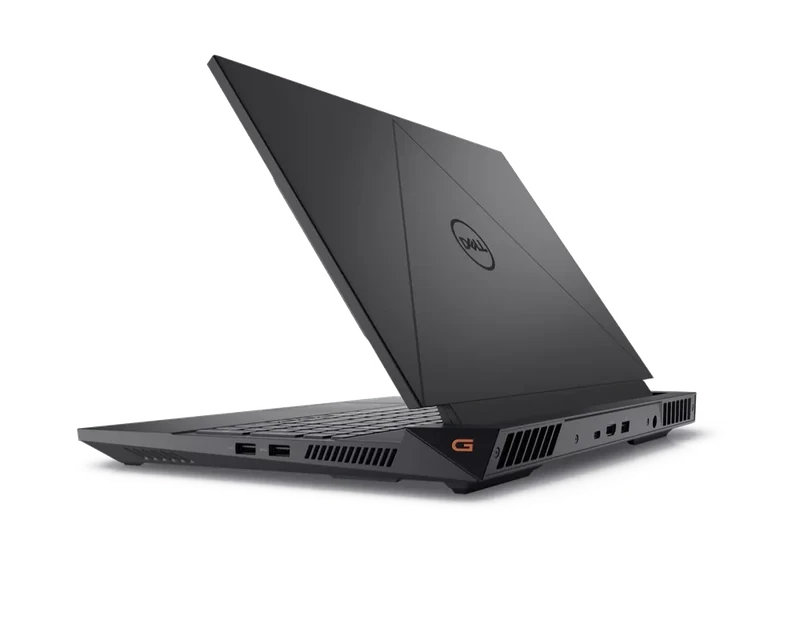
Full Specifications
| GPU | RTX 4070 8GB GDDR6 · 100W TGP |
| CPU | Intel Core i9-13900HX · 24 cores · up to 5.4GHz |
| RAM | 16GB DDR5-5600 · dual-slot, upgradeable to 64GB |
| Storage | 1TB PCIe Gen4 NVMe |
| Display | 16" 2560×1600 QHD+ IPS 240Hz 3ms · 300 nits |
| Keyboard | Cherry MX mechanical (optional) / standard membrane |
| Weight | 2.6kg |
| Battery | 86Wh |
| Price | $1,599 |
Score Breakdown
Gaming Performance — 1440p Benchmarks
The RTX 4070 at 100W handles QHD+ gaming well, particularly with DLSS enabled. At native 2560×1600, demanding titles need DLSS Quality to stay above 60fps — but the 240Hz display is best exploited in less demanding titles like CS2 and Fortnite where the RTX 4070 shines. The i9-13900HX is not a bottleneck at any gaming resolution.
| Game | Settings | Avg FPS | 1% Low |
|---|---|---|---|
| Cyberpunk 2077 | High + DLSS Quality 1440p | 84 | 66 |
| Black Myth: Wukong | High + DLSS Quality 1440p | 72 | 54 |
| Alan Wake 2 | High + DLSS Quality 1440p | 68 | 52 |
| Forza Horizon 5 | Ultra 1440p | 108 | 88 |
| CS2 | High 1080p | 240+ | 198 |
| Elden Ring | Max 1440p | 78 | 64 |
1440p unless noted · DLSS 3 where supported · Performance mode · Apr 2026
The Cherry MX Keyboard — The Real Story
No other gaming laptop at this price offers a mechanical keyboard option. The Cherry MX Ultra Low Profile switches have genuine tactile feedback — not mushy membrane or shallow scissor-switch. For students or professionals who type 4+ hours a day alongside gaming, this alone justifies the G16 over the TUF A16 or Gigabyte A16. The key travel is shorter than a desktop mechanical but noticeably better than any competing membrane keyboard in this price bracket.
Display — QHD+ 240Hz Is Exceptional Here
The 16-inch 2560×1600 IPS at 240Hz is the best display in the under-$1,600 category. 300 nits, 100% sRGB, 3ms response time. Text is sharp at QHD+ resolution, and the 16:10 aspect ratio gives extra vertical space for productivity tasks. The only catch: the RTX 4070 at 100W can't fully exploit 240Hz in the most demanding games without DLSS. For CS2, Fortnite, and Valorant, 240Hz is easily achieved.
Thermals
Dell's dual-fan cooling handles the RTX 4070 and i9-13900HX well. GPU peaks at 80°C, CPU at 88°C under full gaming load. Fan noise hits 46dB max — comparable to the TUF A16. The thermal solution is more refined than expected at this price point, with no throttling observed across our 30-minute sustained tests.
Battery Life
The 86Wh battery gives 4–5 hours of productivity use. Gaming drains it in about 90 minutes. Better than most gaming laptops in this bracket, but the 2.6kg weight means portability is secondary anyway. The G16 is primarily a desk machine.
Build Quality & Ports
Solid plastic chassis with a matte dark finish — not premium but sturdy. The Alienware-heritage design DNA shows in the build quality details. Ports: 3× USB-A 3.2, 1× USB-C (DisplayPort), 1× HDMI 2.1, Ethernet, SD card reader, headphone jack. The SD card reader is a notable inclusion that rivals like the TUF A16 omit.
- Cherry MX keyboard — best typing in this price bracket
- QHD+ 240Hz display — exceptional for the price
- i9-13900HX — never CPU-limited
- 86Wh battery — best in class for the tier
- SD card reader included
- RTX 4070 — previous-gen, no DLSS 4
- 2.6kg — heavy for a 16-inch
- Only 16GB RAM at $1,599
- No RTX 50 series features