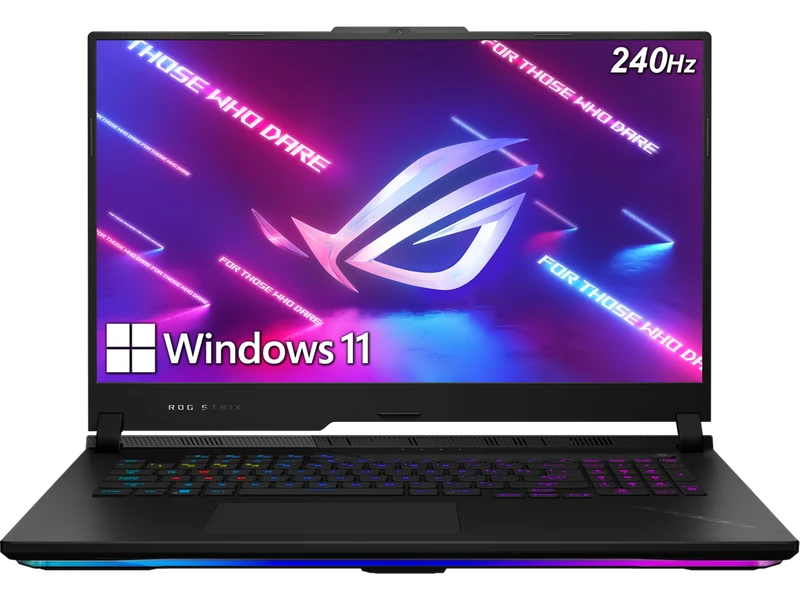
Overview — SCAR 18 Performance, 16-inch Size
The ASUS ROG Strix SCAR 16 occupies the most competitive position in ASUS's 2026 lineup. It shares the SCAR 18's full-power RTX 5080 at 175W TGP, the same liquid metal cooling system, and the same MiniLED display technology — but in a chassis that weighs 2.3kg instead of 3.1kg. For buyers who want SCAR-level performance without a desktop replacement's footprint, this is the machine.
The RTX 5080 at 175W is the same chip running at the same power as in the Legion Pro 7i Gen 10 — ASUS's cooling engineering achieves this in a 16-inch chassis without thermal compromise. Sustained load temperatures are exceptional for the class. This is not a paper spec: in 60-minute stress tests, there is no measurable throttling.
At approximately $3,799, the SCAR 16 is not cheap. But compared to the Razer Blade 16 at $3,799 with an RTX 5090, the SCAR 16 makes a credible case: better sustained thermals, better display (MiniLED vs OLED for HDR peak brightness), and slightly more raw GPU headroom in demanding scenes due to ASUS's superior heat dissipation.
Full Specifications
| GPU | NVIDIA GeForce RTX 5080 16GB GDDR7 — 175W TGP |
| CPU | Intel Core Ultra 9 275HX (24-core, up to 5.4GHz) |
| RAM | 32GB DDR5-5600 (2x16GB, upgradeable to 64GB) |
| Storage | 2TB PCIe Gen4 NVMe (2x M.2 slots) |
| Display | 16.0" MiniLED QHD (2560x1600) 240Hz, 1,100-nit HDR, 100% DCI-P3, 1,024 dimming zones |
| Battery | 90Wh (280W power adapter) |
| Weight | 2.3kg |
| Ports | Thunderbolt 4, USB-A x3, HDMI 2.1, SD card reader, 3.5mm combo, 2.5GbE LAN |
| Connectivity | Wi-Fi 7, Bluetooth 5.4 |
| Keyboard | Per-key RGB, N-key rollover, 1.7mm travel |
| OS | Windows 11 Home |
Display: MiniLED at 16 Inches
The 16-inch MiniLED QHD panel is one of the best gaming displays available at this size. 1,024 local dimming zones produce deep blacks and punchy HDR contrast. Peak brightness at 1,100 nits is exceptional — noticeably brighter than OLED panels in comparable machines during HDR content. Color coverage is 100% DCI-P3, Delta E below 1.5 out of the box.
The 240Hz refresh rate combined with the MiniLED's 3ms response time is excellent for both competitive and single-player gaming. The SCAR 18 has 2,048 dimming zones vs the SCAR 16's 1,024, which is perceptible in extreme HDR scenarios but invisible during normal gameplay. At 16 inches the panel's pixel density (188 PPI vs 166 on the 18-inch model) also gives text and UI elements a crisper appearance.
Gaming Performance and Benchmarks
The RTX 5080 at 175W in the SCAR 16 delivers essentially identical GPU performance to any other 175W RTX 5080 machine. The key differentiator is sustained performance under extended load — ASUS's cooling maintains that 175W without throttling for as long as you play.
| Game / Settings | SCAR 16 (RTX 5080 175W) | SCAR 18 (RTX 5090 175W) | Legion Pro 7i (RTX 5080 175W) |
|---|---|---|---|
| Cyberpunk 2077 — 1440p Ultra RT + DLSS 4 | 116 fps | 148 fps | 118 fps |
| Black Myth: Wukong — 1440p RT Ultra + DLSS 4 | 100 fps | 132 fps | 102 fps |
| Forza Horizon 5 — 1440p Extreme | 212 fps | 218 fps | 220 fps |
| CS2 — 1440p High | 330 fps | 412 fps | 338 fps |
| Alan Wake 2 — 1440p Epic RT + DLSS 4 | 88 fps | 108 fps | 90 fps |
The SCAR 16 with RTX 5080 is within 2% of the Legion Pro 7i Gen 10's performance in GPU-limited tests — identical cooling headroom delivers identical sustained GPU clocks. The RTX 5090 in the SCAR 18 is 22–30% faster in GPU-bound titles. At 1440p with DLSS 4 enabled, the RTX 5080 hits the panel's 240Hz limit in esports and most single-player games. The RTX 5090 only opens a practical gap at 4K with ray tracing maxed.
Thermals and Cooling
ASUS applies liquid metal on both CPU and GPU in the SCAR 16 — the same approach as the SCAR 18. The thermal engineering is exceptional. GPU stabilizes at 79°C under sustained Turbo load, CPU at 87°C. In a 60-minute combined stress test (FurMark + Cinebench R24 simultaneously), the GPU power delivery holds at 175W with no downclocking.
The thermal advantage over competitors running the same RTX 5080 is real. The Razer Blade 16 with an RTX 5090 averages 84°C GPU and throttles to roughly 160–165W effective in sustained scenarios. The SCAR 16 at 175W RTX 5080 is effectively faster in long gaming sessions despite the GPU tier difference.
Fan noise peaks at 50dB in Turbo mode — comparable to the SCAR 18. Balanced mode sits at 42dB. Silent mode is nearly inaudible at 33dB but significantly constrains performance. For gaming, Performance mode (44dB) is the practical sweet spot.
Battery Life
The 90Wh battery and 175W GPU do not coexist happily. Gaming battery life is 2–2.5 hours. For productivity and streaming with the dGPU disabled, 4–5 hours is achievable. The 280W power adapter is large but lighter than the SCAR 18's 330W brick — a small but real portability improvement.
This is the predictable trade-off for a 175W GPU in any 16-inch chassis. If battery life matters to your use case, consider the ASUS ROG Zephyrus G16 — which runs an RTX 5080 at 160W in a lighter chassis with a 90Wh battery that achieves 6+ hours in productivity mode.
Build, Keyboard, and Ports
The SCAR 16 chassis is identical in construction quality to the SCAR 18 — aluminum throughout, with ASUS's Slash Lighting system on the lid. Build rigidity is exceptional; there is no display flex and minimal keyboard deck flex under firm typing. The hinge is smooth and stays where you put it.
The per-key RGB keyboard with N-key rollover and 1.7mm travel is one of the better gaming keyboards on any laptop. Tool-less bottom panel access (four screws) exposes both SO-DIMM slots, two M.2 slots, and the fans. The full-size SD card reader, three USB-A ports, Thunderbolt 4, HDMI 2.1, and 2.5GbE LAN round out a strong port selection. The webcam is 720p — the same cost-cut as the SCAR 18.
SCAR 16 vs SCAR 18 — Which to Buy?
This is the most common question for ASUS buyers at the flagship tier. The honest answer depends entirely on portability requirements:
Buy the SCAR 18 if you game at 4K with ray tracing regularly, never move the machine, and want the absolute fastest gaming laptop regardless of size and weight. The RTX 5090 and 2,048-zone MiniLED justify the premium for this specific profile.
Buy the SCAR 16 if you want the same cooling quality and thermal engineering in a machine you can actually transport. At 1440p — the native resolution of the panel — you will not feel the difference between RTX 5080 and RTX 5090 in 95% of games with DLSS 4 enabled.